
In the world of small business, staying connected is crucial for success. Whether you’re communicating with clients, managing team collaboration, or handling customer service, having the right tools in place can make all the difference.
Business phone apps are an essential part of modern-day business operations, offering everything from call management to team communication on the go.
In this article, we’ll explore the best business phone apps for small companies in Europe, discuss the features that matter most, and help you choose the right app to improve your business communication.
What is a Business Phone App?
A business phone app is a mobile or desktop application designed to replace or supplement traditional phone systems in business settings. These apps allow businesses to manage communications more efficiently, with features like:
- VoIP (Voice over Internet Protocol) calls
- Team collaboration tools
- Call forwarding
- Text messaging and chat
- Voicemail transcription
With the rise of remote work and the shift to digital tools, business phone apps help businesses manage both internal and external communication more effectively while maintaining a professional image.
Why Your Small Business Needs a Business Phone App
For small businesses in Europe, having the right communication tools in place is essential for keeping things running smoothly. A business phone app offers several benefits, including:
Cost-Effective Communication
Traditional phone systems can be expensive to set up and maintain, especially for small companies. With a business phone app, you can reduce costs significantly, as many apps offer affordable subscription models and operate over the internet, eliminating the need for costly hardware and phone lines.
Mobile Flexibility
Whether you’re working from the office, at home, or on the go, a business phone app allows you to stay connected. With features like call forwarding, voicemail, and mobile apps, you can handle business calls no matter where you are.
Scalability
As your business grows, so will your communication needs. Business phone apps are typically scalable, allowing you to add users or features as your company expands. This flexibility ensures that the app can grow with your business without the need for a complete system overhaul.
Improved Customer Service
Customer service is one of the most important aspects of any business, and a business phone app can help enhance the customer experience. Many apps come with features like call analytics, voicemail transcription, and automated call handling, which can help you respond to customers faster and more efficiently.
Streamlined Communication
A business phone app often includes collaboration tools that make team communication easier. From shared phone directories and team messaging to conference calling, these apps streamline communication within your team, keeping everyone on the same page.
Best Business Phone Apps for Small Companies in Europe
Here are some of the best business phone apps that are popular among small businesses in Europe in 2026. These apps are designed to help you manage communication, improve team collaboration, and enhance customer service—all at an affordable price.
RingCentral
RingCentral is one of the top business phone apps for small companies, offering a complete communication solution that includes VoIP calling, video conferencing, team messaging, and collaboration tools. With RingCentral, small businesses can handle all aspects of communication, from phone calls to video meetings, in one platform.
Key Features:
- VoIP phone system
- Video conferencing and team messaging
- Call management and analytics
- Mobile and desktop compatibility
RingCentral is a great choice for businesses that need a comprehensive communication platform to manage calls, video meetings, and team collaboration.

Grasshopper
Grasshopper is a popular business phone app for small businesses, particularly those looking for an easy way to manage business calls on their mobile devices. It offers VoIP services, call forwarding, voicemail transcription, and even a virtual receptionist to handle incoming calls.
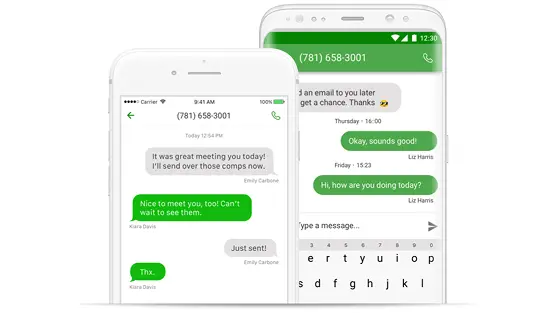
Key Features:
- VoIP phone system
- Call forwarding and voicemail
- Virtual receptionist
- Mobile and desktop compatibility
Grasshopper is perfect for small businesses that need a simple and affordable phone system with features like call forwarding and voicemail transcription.
Nextiva
Nextiva is a robust business phone app designed to help small businesses communicate more efficiently. It offers VoIP calling, team messaging, video conferencing, and a range of call management features to help businesses stay organized and connected.
Key Features:
- VoIP calls and video conferencing
- Team messaging and collaboration
- Call analytics and reporting
- Mobile and desktop apps
Nextiva is a great option for small businesses that need a complete communication solution with advanced features like call analytics and reporting.
Zoho Voice
Zoho Voice is a cloud-based business phone app that offers VoIP calling, call forwarding, voicemail transcription, and integration with Zoho’s suite of business tools. It’s designed to streamline communication for small businesses and improve team collaboration.
Key Features:
- VoIP calling and call forwarding
- Integration with Zoho apps
- Team messaging and collaboration
- Mobile and desktop apps
Zoho Voice is perfect for small businesses already using Zoho’s suite of tools, as it integrates seamlessly with their CRM, projects, and marketing platforms.

Key Features to Look for in a Business Phone App
When choosing the best business phone app for your small company, there are several features to consider. These features will help you find an app that meets your business needs and enhances your communication capabilities.
VoIP and Internet Calling
A reliable business phone app should include VoIP functionality, allowing you to make calls over the internet rather than relying on traditional phone lines. VoIP calls are typically more affordable and provide higher flexibility for small businesses, especially those with remote or distributed teams.
Team Collaboration Tools
Look for a business phone app that offers collaboration features like group chats, file sharing, and internal messaging. These tools will help your team communicate more effectively and stay organized, especially if your team works remotely.
Call Management
Effective call management features are essential for small businesses. Key features to look for include call forwarding, voicemail transcription, auto-attendants, and call analytics. These tools ensure that no important call is missed, even if you’re away from the office.
Mobile and Desktop Compatibility
Your team needs to stay connected whether they’re in the office or working remotely. Make sure the business phone app you choose works seamlessly on both mobile and desktop devices. This allows employees to make and receive calls, access messages, and collaborate from anywhere.
Integrations with Other Tools
A good business phone app should integrate with other business tools you use, such as your CRM (Customer Relationship Management) system, email platform, and project management apps. Integrations will help streamline your workflow, improve efficiency, and ensure that all customer information is readily available.
Security Features
Since you’ll be handling sensitive information, it’s important to choose a business phone app that offers strong security features. Look for apps that offer end-to-end encryption, secure call handling, and data protection protocols to safeguard your business communications.
How to Choose the Best Business Phone App for Your Company
Choosing the right business phone app for your small business depends on several factors, including your communication needs, team size, and budget. Here are a few things to consider when making your decision:
Identify Your Communication Needs
Consider what features you need in a business phone app. Do you need basic calling and voicemail features, or do you require more advanced features like video conferencing and team messaging?
Consider Your Team Size
If you have a small team, you may not need a highly complex system. Look for apps that are simple to use but still offer the features your team needs. For larger teams, consider apps with more advanced features and scalability.
Check Integration Capabilities
If you’re already using other business tools, choose a business phone app that integrates well with those tools. This ensures smoother workflows and easier communication management.
Evaluate Pricing Plans
Consider your budget when selecting a business phone app. Many apps offer tiered pricing plans, so make sure you select one that fits within your budget while offering the features you need.
Conclusion
Choosing the right business phone app is essential for small businesses looking to improve communication, increase productivity, and enhance customer service. Whether you choose Apple Time, RingCentral, Grasshopper, Nextiva, or Zoho Voice, make sure the app you select meets your unique business needs.
By evaluating your communication requirements and considering the features of each app, you can make an informed decision that will help your business stay connected and grow.
Sources:
- RingCentral – RingCentral
- Grasshopper – Grasshopper
- Nextiva – Nextiva
- Zoho Voice – Zoho Voice
